Troubleshooting - Node reports 0 KB size disk usage on Redpanda
Last updated: August 11, 2026
Problem Statement
- In the below screenshot, one could easily observe the disk utilisation on the node 3 is 0
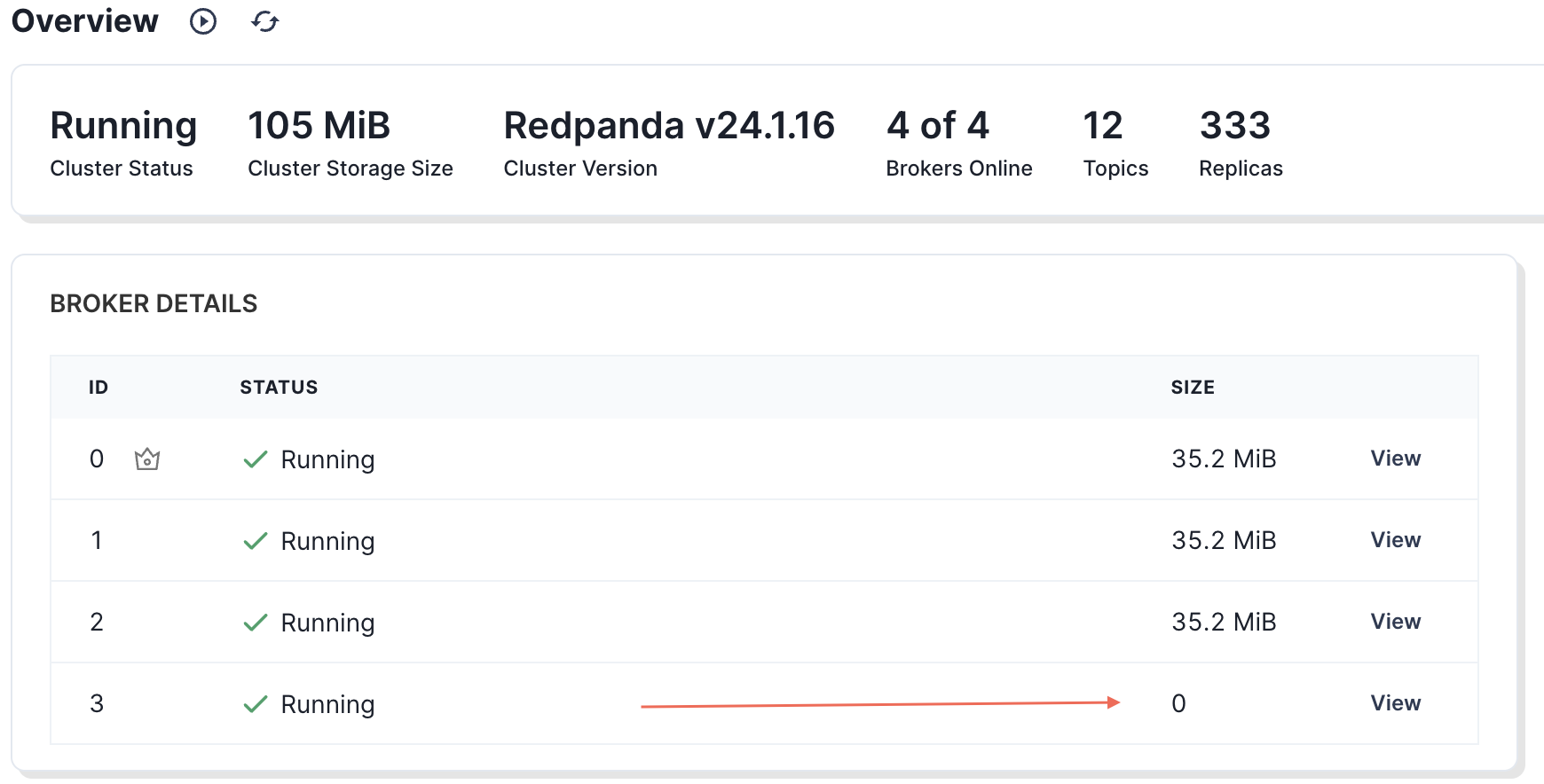
- Since the node is part of the cluster, it should retain partition data. We need to investigate this situation further.
Troubleshooting
Need to understand the complete deployment of the cluster i.e
- How many brokers in the cluster, health check and cluster info.
redpanda@39c5ba6281ec:/$ rpk cluster health

CLUSTER HEALTH OVERVIEW

=======================

Healthy: true

Unhealthy reasons: []

Controller ID: 0

All nodes: [0 1 2 3]

Nodes down: []

Leaderless partitions (0): []

Under-replicated partitions (0): [] - Given that the cluster appears to be healthy, we need to explore potential factors that could have led to this situation.
- Check if there are any partitions assigned to the Node 3
- You could check using the below command.
rpk topic describe -r '*' | grep -o "\[[^]]*\]" | sed 's/[][]//g; s/ /\n/g' | sort -n | uniq -c
- I don't see any partition assigned to node 3.
redpanda@a0f5212c0270:~/data/redpanda$ rpk topic describe -r '*' | grep -o "\[[^]]*\]" | sed 's/[][]//g; s/ /\n/g' | sort -n | uniq -c111 0111 1111 2 - Next will be looking at the data directory on the node.

- Don't see any kafka directory present here, this is the directory which will be holding the partition data.
- We could look at the creation time for kvstore and Controller directory on the good/working node i.e. could be (node0, node1 or node2) and on Node 3 respectively
On the any other good working node node it looks like this
redpanda@413f176e0600:~/data/redpanda$ ls -ltr /var/lib/redpanda/data/redpanda/total 8drwxr-xr-x 3 redpanda redpanda 4096 Sep 17 01:31 kvstoredrwxr-xr-x 3 redpanda redpanda 4096 Sep 17 01:31 controller
While on the Node 3
redpanda@a0f5212c0270:~/data/redpanda$ ls -ltr /var/lib/redpanda/data/redpanda/total 8drwxr-xr-x 3 redpanda redpanda 4096 Sep 18 05:02 kvstoredrwxr-xr-x 3 redpanda redpanda 4096 Sep 18 05:02 controller
This looks like kvstore and controller directory in Node 3 were lost and recreated at a certain point.
Solution
- To fix the above situation, we could trigger manual balancer to rebalance the partition across the nodes, please make sure to run it on the coordinator node.
curl -X POST http://localhost:9644/v1/partitions/rebalance
Check the balancer-status using the below command
redpanda@413f176e0600:/$ rpk cluster partitions balancer-statusStatus: in_progressSeconds Since Last Tick: 27Current Reassignment Count: 0 -
See if
Current Reassignment Count:is > 0 which means balancer is running. In a small cluster, it will be fairly quick though.