How to use Redpanda Cloud Data Plane API
Last updated: August 10, 2026
Problem Statement
Redpanda Cloud service provides APIs to manage the cluster, such as creating a user, ACL, managing Redpanda Connect, and Kafka Connect. This article explains how to set up and access APIs step by step, and shares a small script to facilitate the process.
Solution
This example explains how to get a list of Kafka connectors using the Data Plane base URL.
Redpanda Cloud APIs have two base URLs. One is the Control Plane base API URL(https://api.redpanda.com/), and the other is the Data Plane base API URL(Cluster API for each cluster). Both can use the same Auth token. The List OperationServices(/v1beta2/operations) and the List clusters(https://api.redpanda.com/v1beta2/clusters) require the Control Plane base API URL.
To get the Data Plane API URL, you must first get your cluster using the Control Plane API.
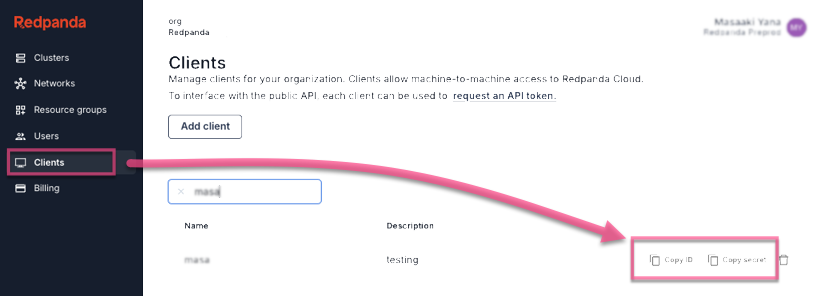
1. Get Client ID and Secret
- Go to the Cloud UI -> Clients -> Select a client -> Copy ID and Secret
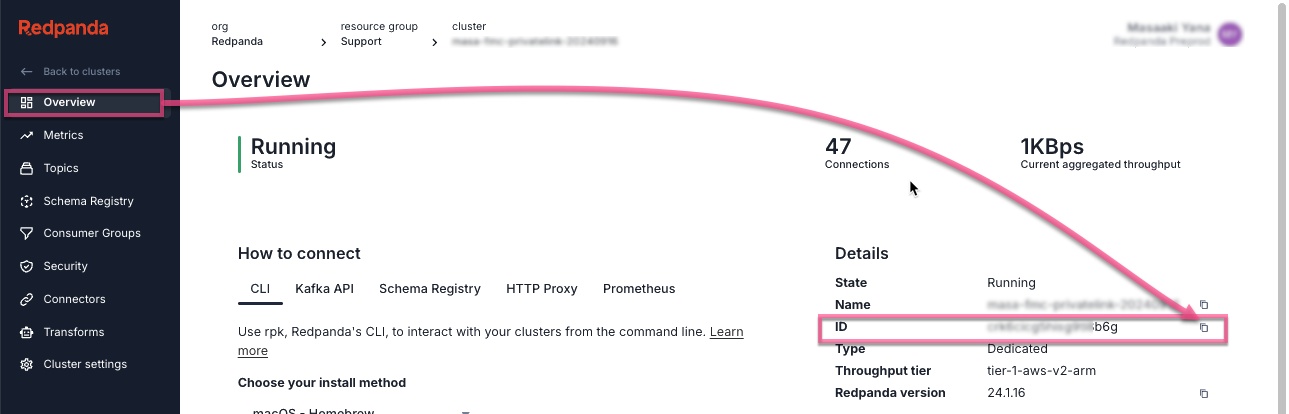
2. Get Cluster ID
- Go to the Cloud UI -> Cluster -> Overview -> Copy the cluster ID
3. Use the following script
- Copy and paste the values collected from Step 1 and Step 2 to CLIENT_ID, CLIENT_SECRET, and CLUSTER_ID.
- If the API versions are different, change them accordingly
Ω


CLIENT_ID=

CLIENT_SECRET=

CLUSTER_ID= # VARIABLES API_VERSION_CONTROLE_PLANE=v1beta2

API_VERSION_DATA_PLANE=v1alpha2


AUTH_ENDPOINT="https://auth.prd.cloud.redpanda.com/oauth/token"

CONTROLE_PLANE_API="https://api.cloud.redpanda.com"

CONTROLE_PLANE_URL=${CONTROLE_PLANE_API}/${API_VERSION_CONTROLE_PLANE}


# 2. Get AUTH_TOKEN

AUTH_TOKEN=$( curl -s --request POST --url $AUTH_ENDPOINT \

 --header 'content-type: application/x-www-form-urlencoded' \

 --data grant_type=client_credentials \

 --data client_id=$CLIENT_ID \

 --data client_secret=$CLIENT_SECRET \

 --data audience="cloudv2-production.redpanda.cloud" | jq -r '.access_token' )

echo -e "\nAUTH_TOKEN: ${AUTH_TOKEN}\n\n"


# 3. Get a Data Plane API
DATA_PLANE_API=$( curl -s -X GET \
  -H "Content-Type: application/json" \
  -H "Authorization: Bearer ${AUTH_TOKEN}" \
  ${CONTROLE_PLANE_API_URL}/clusters/${CLUSTER_ID} | jq -r '.cluster.dataplane_api.url' )

echo -e "\nCLUSTER_API(data_plane_api_url): ${DATA_PLANE_API}\n\n"
DATA_PLANE_API_URL=${DATA_PLANE_API}/${API_VERSION_DATA_PLANE}

# 4. Get a kafka connectors list
curl -s -X GET "${DATA_PLANE_API_URL}/kafka-connect/clusters/redpanda/connectors" \
 -H "accept: application/json" \
 -H "Authorization: Bearer ${AUTH_TOKEN}"
Notes
For specific errors and troubleshooting, such as i/o timeout, please refer to Redpanda docs and/or other KB articles
References:
https://docs.redpanda.com/redpanda-cloud/manage/api/cloud-api-overview/
https://docs.redpanda.com/redpanda-cloud/manage/api/cloud-dataplane-api/
If you have any questions on this notice or need further guidance, please contact Redpanda Support