Redpanda Connect Cloud - ConnectError: [invalid_argument] provided parameters are invalid
Last updated: August 10, 2026
In current implementation of Redpanda Connect in cloud , you may get this error when attempting to create a pipleline
Failed to create pipeline

ConnectError: [invalid_argument] provided parameters are invalid
This is telling us something is wrong with the pipleline validation, but no specific information on the actual cause..
It's possible to get more detail on the validation error , by running a browse dev tools and seeing the response from the API call that creates the pipeline.
For example with Chrome
- In the Developer Tools pane, choose the Network tab.
- Choose the Network tab.
Then try to create the pipeline again....
Check the call to the CreatePipleline endpoint
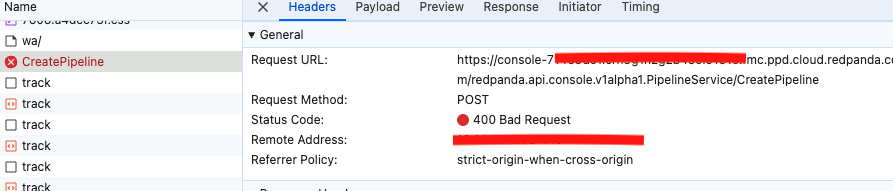
In the Response you will see more detailed information on the cause of the field validation error (fieldViolations)
For example.
(Name of pipeline needs be be at least 3 characters)
"debug": {

"fieldViolations": [

{

"field": "request.pipeline.display_name",

"description": "value length must be at least 3 characters"

...
(Name of pipeline has unsupported character in name...such as @ )
 "debug": {

"fieldViolations": [

{

"field": "request.pipeline.display_name",

"description": "value does not match regex pattern `^[A-Za-z0-9-_ /]+$`"

}
Redpanda is currently working on a fix to report these kind of field validations directly in the Console UI.