Troubleshoot Tiered Storage IAM Policy Issues
Last updated: August 11, 2026
Tiered Storage helps to lower storage costs by offloading log segments to AWS S3 Object storage.
Please refer the document to configure the IAM roles .
We will be looking at the below 2 ways to configure the TS.
|
|
If IAM roles are not available, specify credentials in the cluster configuration file. |
|
|
For an AWS EC2 instance, use the instance metadata API from AWS. |
We will be looking at aws_instance_metadata
Once we have configured the IAM roles, then it is time to configure the Tiered Storage configuration.
Run the rpk cluster config edit command, then edit the following required properties:
cloud_storage_enabled: true
cloud_storage_credentials_source: aws_instance_metadata
cloud_storage_region:
cloud_storage_bucket:
Once we restarts the Redpanda Cluster, If we face some kind of errors like below :-
WARN 2023-10-25 03:44:28,371 [shard 1] s3 - s3_client.cc:671 - S3 PUT request failed: Forbidden [x-amz-request-id: FGZSQCWBXY7NG17P];[x-amz-id-2: ZfJPnS7UNu0/uP3IHRKgYo09pa3YFwhuLmWWohzXGKxb/aDmA/N8hs1M4ffqXpMuTWaTXDNVHuQ=];[Content-Type: application/xml];[Transfer-Encoding: chunked];[Date: Wed, 25 Oct 2023 03:44:27 GMT];[Server: AmazonS3];[Connection: close];
Then we could follow the below steps to troubleshoot the issue, From One of the Redpanda node, make sure it has the aws cli installed.
1.
aws sts get-caller-identity Please confirm the UserID, Account and Arn. Make sure you are able to run the below command
2.
aws s3 ls
3. Get the role name from the below command

rolename in the below command
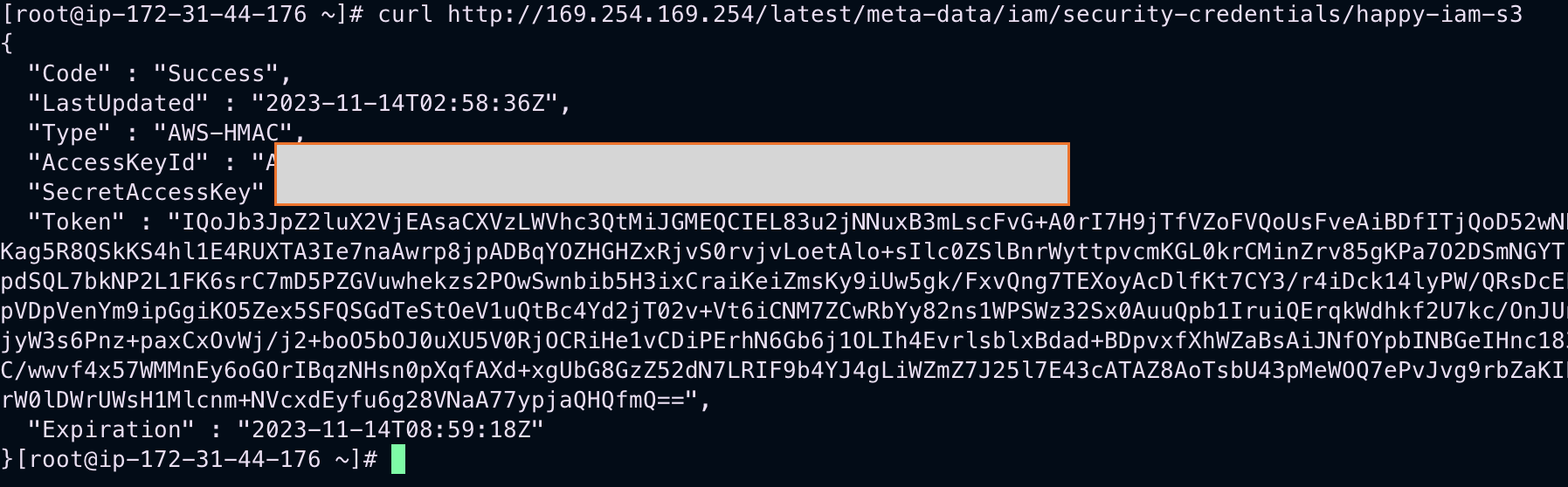
5. Use the Access key and secret key to access the S3 from the CLI.
aws s3 cp  s3://testbucket

aws s3 ls 
With the above steps, we will be sure the role which we are using have the correct privilege for the AWS S3 Object Storage.
Next Steps during above command failure :-
If for any of the reason, the above aws s3 command fails then it means the IAM roles and Policies are not configured correctly, at this point we would suggest to take suggestion from AWS experts via AWS support case.